Pickleball scorekeeper & on-device coach
Score every rally.
Learn from every match.
Track matches from your iPhone or Apple Watch, reflect on your performance, and turn every result into a focused plan for your next session.
No account required. Your game stays on your device.
Four parts of improvement, in one app
Start Pickleball connects playing, reflecting, coaching and practice, so each match feeds the next.
- 1 Play
Play and score
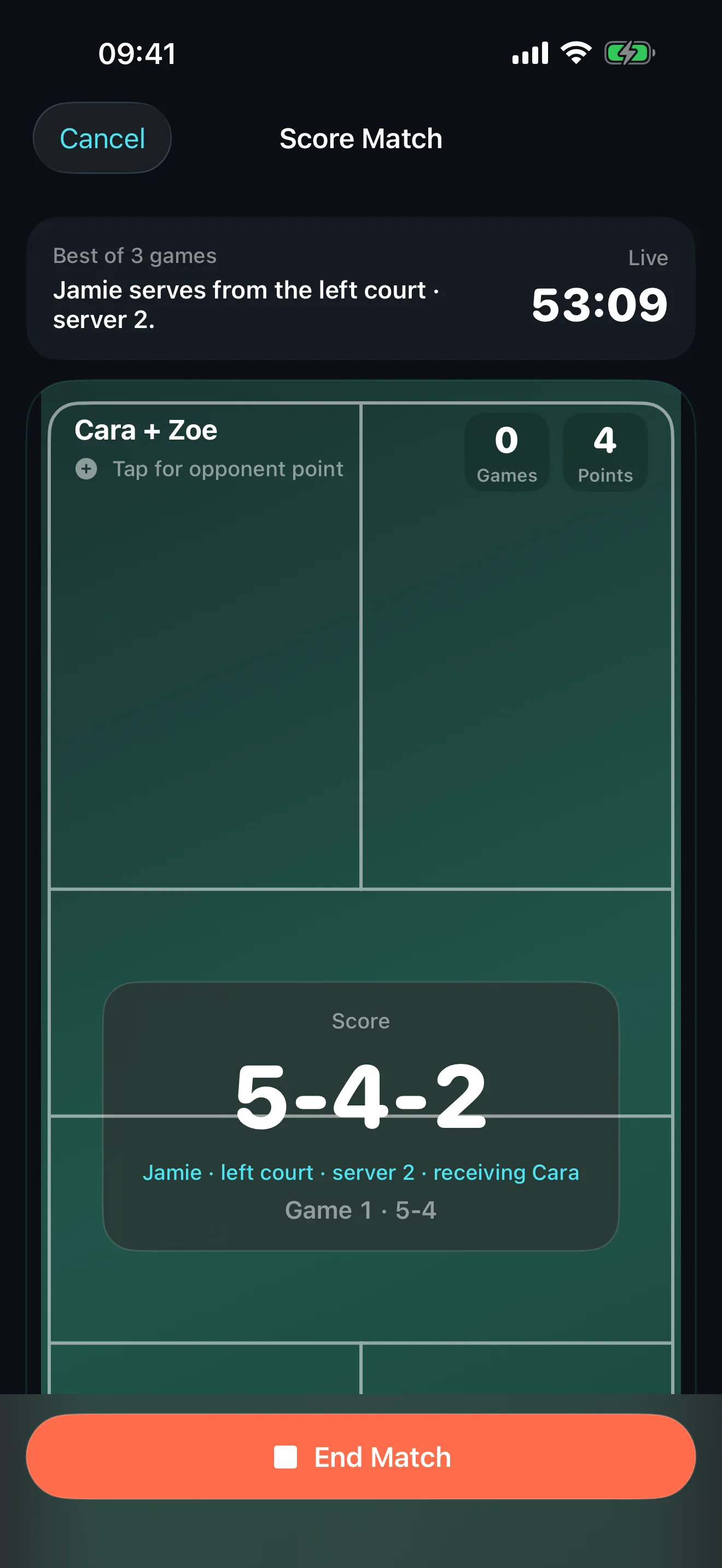
Score live on iPhone or Apple Watch, or add a completed match afterwards.
- 2 Reflect
Reflect after the match
A short voice or typed debrief captures what worked and what went wrong.
- 3 Coach
Receive a focused plan
Your matches become one clear focus, a recap with evidence, and relevant drills.
- 4 Practise
Practise and measure
Run timed sessions and track rating, trends and recurring weaknesses over time.
Features
Everything you need to play, reflect and improve
Built for recreational and competitive players who want to improve deliberately, not just record wins and losses.
-
Live match scoring
Score singles or doubles from your phone with side-out or rally scoring, undo the last point, and resume an unfinished match later.
-
Apple Watch scoring
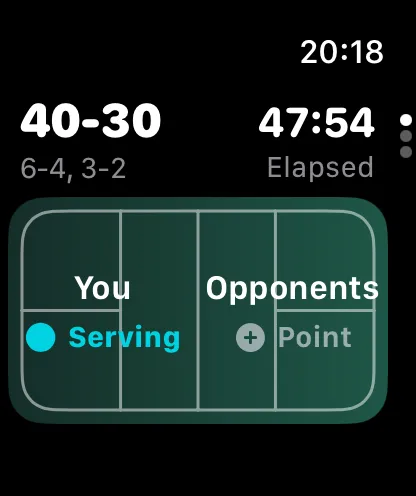
Add points from your wrist, watch the score and elapsed time as you play, undo mistakes, and end the match on Watch to sync the final result back to iPhone.
-
Match history
Add results after the fact, record teams, formats and scores, and keep your complete playing record in one place.
-
Post-match debrief
Answer a few guided questions after playing. Speak your answers with on-device transcription or type them, then edit the extracted details before you rely on them.
-
Personal coaching
Your result, debrief, recent matches, level and goals become a focused plan: the primary area to improve, a match recap with evidence, a focus for next time, and relevant drills.
-
Training
Turn plans into practice. Each drill shows its goal, setup, steps, court diagram, cues, common mistakes and a success measure. Run timed sessions and record how useful they felt.
-
Progress and achievements
See matches, wins, win rate and training totals, track skill rating, level, confidence and activity XP, surface recurring weakness tags, and unlock achievements as you play.
-
Rules referee
Ask a rules question mid-match. Answers use the live format, score and serving context where relevant, with practical shortcuts for common disputes.
-
Sharing
Create a vertical match-result card, choose first names or hide all names, and share it through the standard iOS share sheet.
-
Privacy by design
No Start Pickleball account is required. Your profiles, matches, notes, coaching and progress are stored locally, Health access is optional, and Start Pickleball declares no advertising tracking.
How it works
From first serve to next session
- 1
Score live or add a completed match
Track a match as you play, or record one you did not score at the time.
- 2
Capture what happened
Complete a quick voice or typed debrief while the match is still fresh.
- 3
Review your focus and drills
See the one area to work on next and the drills recommended for it.
- 4
Practise and track progress
Complete practice sessions and watch your progress build over time.
Basic & Pro
Start free. Go deeper with Pro.
Basic
- Core match scoring
- Apple Watch scoring
- Past-match entry
- Rules tools and match sharing
- Match history limited to five saved matches
Start Pickleball Pro
- Unlimited match history
- Personal coaching plans
- Recommended training plans and practice sessions
- Advanced progress analytics
Available subscription periods and current prices are shown in the App Store and inside the app.
Privacy
Your game stays your game
No account is required, and your core data stays on your device. Optional Apple services like voice transcription, Apple Intelligence and Apple Health are controlled entirely through system permissions. Start Pickleball declares no advertising tracking.
Read the Privacy PolicyFAQ
Questions, answered
Do I need an account?
No. Start Pickleball does not require an account. Your core player and match data is stored locally on your device.
Can I score from Apple Watch?
Yes. You can add points from your wrist, see the score and elapsed time, undo the last point, and end the match on Apple Watch, which syncs the final result to your iPhone.
What match formats are supported?
Singles and doubles with the scoring formats available in the app, including traditional side-out scoring and rally scoring where selected.
Does Start Pickleball work without Apple Intelligence?
Yes. On eligible devices, coaching can use Apple Intelligence on device. When on-device generative features are unavailable, Start Pickleball uses its private curated training library and rule-based guidance instead. Not every device receives generative output.
Is coaching medical advice or a replacement for a coach?
No. Start Pickleball offers general practice guidance for pickleball. It is not medical advice and is not a substitute for a qualified coach or healthcare professional. Stop activity if you feel pain and seek appropriate professional advice.
Where is my data stored?
Core profiles, matches, notes, debriefs, coaching plans, training history, achievements and progression are stored locally on your device using Apple platform storage. They are not uploaded to a Start Pickleball account or server.
What does Start Pickleball Pro include?
Start Pickleball Pro adds unlimited match history, personal coaching plans, recommended training plans and practice sessions, and advanced progress analytics. Available subscription periods and current prices are shown in the App Store and inside the app.
How do I manage or cancel a subscription?
Subscriptions are managed through your Apple ID. Open the App Store, tap your account, choose Subscriptions, then select Start Pickleball to change or cancel. Cancelling stops the next renewal while keeping access until the end of the current period.
How do I delete my data?
You can use “Delete all app data” in the app, or remove the app, subject to normal device backups and Apple-managed services. Deleting local data does not necessarily delete workouts already written to Apple Health, which you can manage in the Health app.
Which devices and operating systems are supported?
Start Pickleball is designed for iPhone with an optional Apple Watch companion. Exact App Store compatibility should be confirmed on the App Store listing. Feature availability may depend on hardware, operating system, language, locale, permissions and Apple service availability.
Start your next match with Start Pickleball
Score every rally, reflect on every match, and turn each result into a focused plan for your next session.